 codegino

TLDR
Check the code here
Check my list of NFTs here
Introduction
Non-fungible tokens (NFT)
- A way to represent anything unique as an Ethereum-based asset.
- NFTs are giving more power to content creators than ever before.
- Powered by smart contracts on the Ethereum blockchain.
OpenSea is the world's first and largest NFT marketplace. It can be used to discover, collect, and sell extraordinary NFTs.
In this article, I will show how I fetch all my collections using OpenSea's API and then display them on my website.
Prerequisite
For us to be able to use OpenSea's API, we need to request an OpenSea API key here
Create a reusable options object for each API call
This will contain the API key provided by OpenSea
1const options = {2 method: 'GET',3 headers: {4 Accept: 'application/json',5 // Do not expose your API key in the browser6 'X-API-KEY': process.env.OPENSEA_API,7 },8};To avoid exposing your API key, refer to this blog.
(OPTIONAL) Create a variable for the wallet's address
This is the address of our wallet. We can use this address to fetch our collections and assets.
1const WALLET_ADDRESS = '0x704CD00cbB8BF91038dFCF8bC008D065DDF1D8F8';Fetch all collections owned by the specified address
1const collectionResponse = await fetch(2 `https://api.opensea.io/api/v1/collections?asset_owner=${WALLET_ADDRESS}`,3 options,4).then(response => response.json());Map the response to the preferred structure
Here is the type definition of how my website used the response data
1type NftCollection = {2 name: string;3 slug: string;4 contractAddress: string;5 details: string;6 owned: {7 id: number;8 img: string;9 name: string;10 }[];11};Here is how the mapping of the response to the above type definition
1const collection = collectionResponse.map((item) => ({2 details: item.description,3 slug: item.slug,4 name: item.name,5 contractAddress: item.primary_asset_contracts[0].address,6 owned: [],7}));For each collection, fetch all assets owned by the defined address
1for (const iterator of collection) {2  const assetsResponse = await fetch(3    `https://api.opensea.io/api/v1/assets?owner=${WALLET_ADDRESS}&asset_contract_address=${iterator.contractAddress}&include_orders=false`,4    options,5  ).then(response => response.json());6
7  iterator.owned = assetsResponse.assets8    .map((item) => ({9      name: item.name,10      img: item.image_url,11      id: item.token_id,12    }))13    .filter((item: any) => item.name && item.img);14}
Putting it all together
1const fetchOwnCollection = async () => {2  const WALLET_ADDRESS = '0x704CD00cbB8BF91038dFCF8bC008D065DDF1D8F8';3
4  const options = {5    method: 'GET',6    headers: {7      Accept: 'application/json',8      'X-API-KEY': process.env.OPENSEA_API as string,9    },10  };11
12  const collectionResponse = await fetch(13    `https://api.opensea.io/api/v1/collections?asset_owner=${WALLET_ADDRESS}`,14    options,15  ).then(response => response.json());16
17  const collection = collectionResponse.map(item => ({18    details: item.description,19    slug: item.slug,20    name: item.name,21    contractAddress: item.primary_asset_contracts[0].address,22    owned: [],23  }));24
25  for (const iterator of collection) {26    const assetsResponse = await fetch(27      `https://api.opensea.io/api/v1/assets?owner=${WALLET_ADDRESS}&asset_contract_address=${iterator.contractAddress}&include_orders=false`,28      options,29    ).then(response => response.json());30
31    iterator.owned = assetsResponse.assets32      .map(item => ({33        name: item.name,34        img: item.image_url,35        id: item.token_id,36      }))37      .filter(item => item.name && item.img);38  }39
40  return collection;41};
Rendering the collection
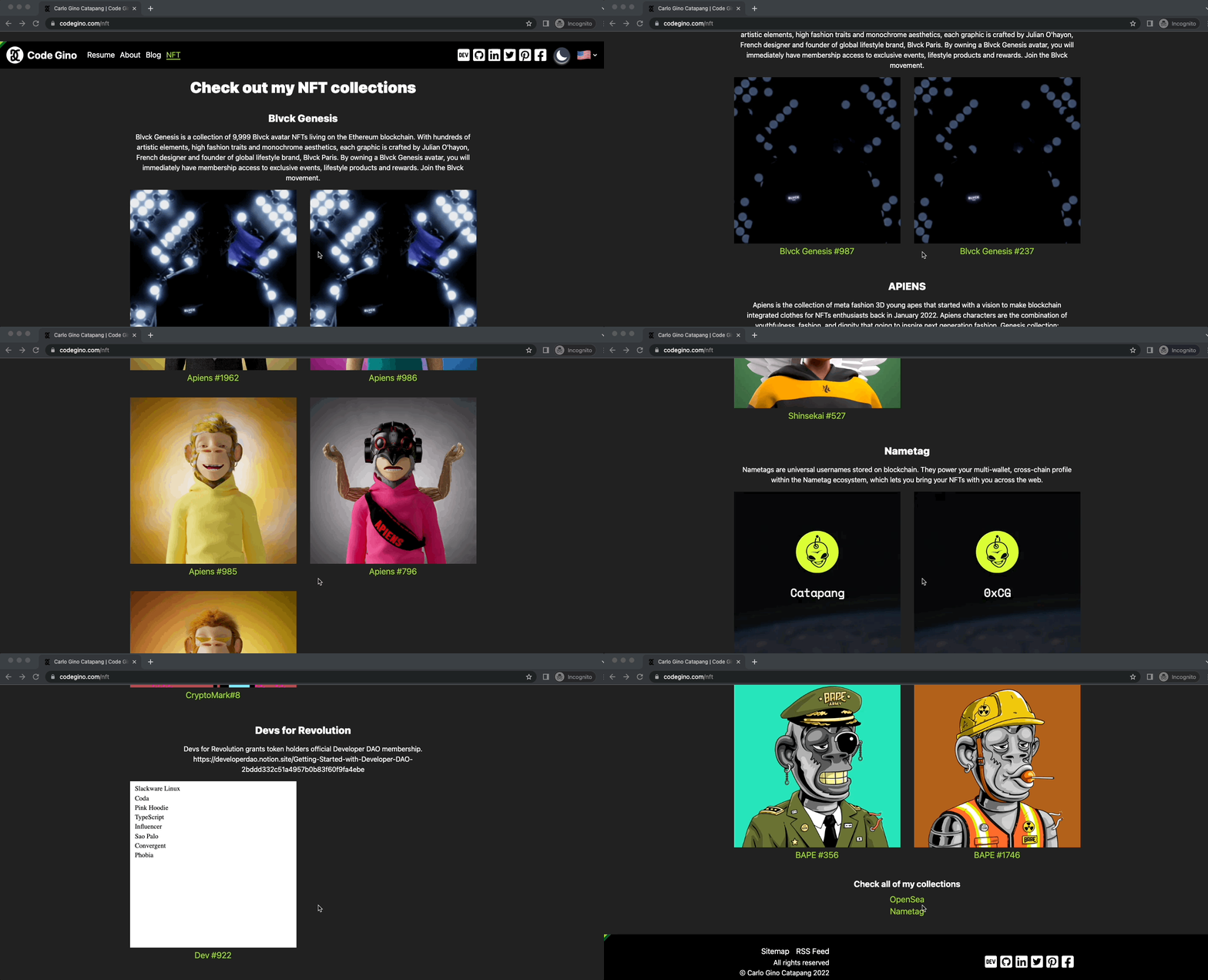
It will depend on the frontend framework of choice. Here is how I did it using NextJs.
NOTE: The overall API requests might be slow when fetched from the browser, make sure to have an appropriate content loader in place. Caching the response might help as well.
Demo
What's next?
Add functionalities for visitors to make offers and buy my NFT collection.